
With the UNIT 1 Remote, you'll unlock these two features in both our Smart Helmets and Smart Lights:
Turn Signaling
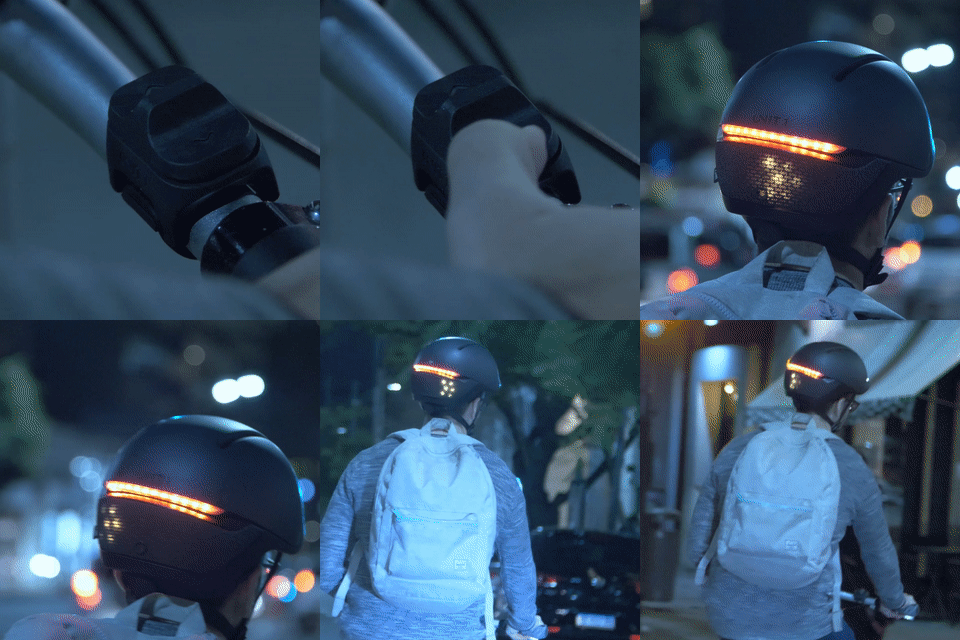
With the tap of a button, your Smart Helmet or Smart Light will display turn signals for left and right turns, clearly communicating your intentions to traffic and other riders—no more messy hand signals! The signals can be set to turn off automatically (perfect for the forgetful) or manually with another press of the button.
Automatic Brake Light
The UNIT 1 Remote is equipped with advanced sensors that detect when a rider slows down or stops, automatically activating a powerful brake light. This ensures those behind you are alerted and can adjust their speed accordingly. You can choose from three sensitivity levels to suit your riding style.

Is the UNIT 1 Remote included with our Smart Helmets?
The UNIT 1 Remote is not included with our Smart Helmets—it’s an optional add-on available for purchase separately. Why? Because we believe you shouldn’t pay for features you don’t need. Learn more here.
Does the UNIT 1 Remote work with touch, or does it have physical buttons?
The remote features physical buttons by design: we prioritized “no-look” controls, making tactile feedback essential. The top of the remote is actually one large button. You can activate the turn signals by pressing either side or nudging the crease in the middle. The nudge also helps you easily locate the button with your thumb. 😊
Important: The Remote Never Turns Off
The UNIT 1 Remote includes an internal accelerometer, which means it never fully powers down. Instead, it goes into sleep mode when not in motion.
If your remote seems unresponsive, it may simply be asleep.
Just shake it lightly, mimicking bike movement — this will wake it up immediately.
How to check if the Remote Is Working
Before assuming it's a pairing issue, let’s first confirm whether the remote is functioning correctly.
Plug the remote into a charger using the USB-C cable.
Watch the LED lights on the remote:
If both lights blink together, it means the remote is charging correctly — the remote is working fine.
If both lights stay on (solid), the remote is fully charged — also fine.
If the lights blink, but not at the same time, this indicates a charging issue — the remote is likely faulty.
If no lights appear at all, even when charging, the remote may not be receiving power — it's likely faulty.
✅ If your remote shows the correct charging behavior (either blinking together or solid), you’re good to proceed.
❌ If your remote shows incorrect behavior or no lights, please chat with AI Bot Leo — it’s an excellent tool to help you with the next steps.